Customers & follow-ups
Keep contacts together and connect them to the work you do.
Fern Café · Maya Chen · Last contacted 20 Oct
Customers, quotes, documents and everyday work in one app. Ask for what’s missing: something to track, your own figures, a routine that runs itself.
14 days free. No card needed.
Keep one customer record, then reference it from the tools you use. Here, Fern Café is the customer on a quote and the Autumn launch job. Each opens in its own working screen.
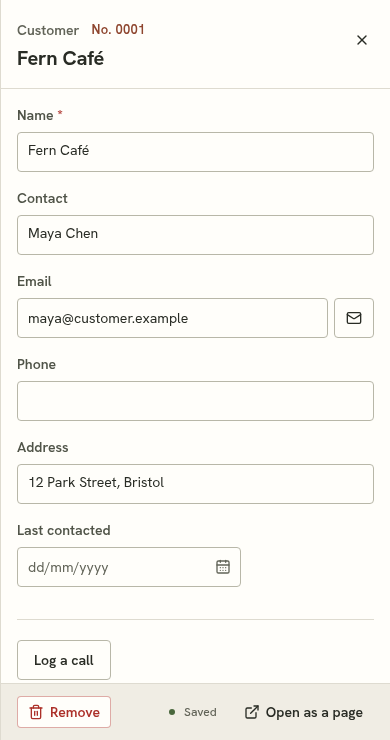
Keep Maya’s contact details on the customer record.
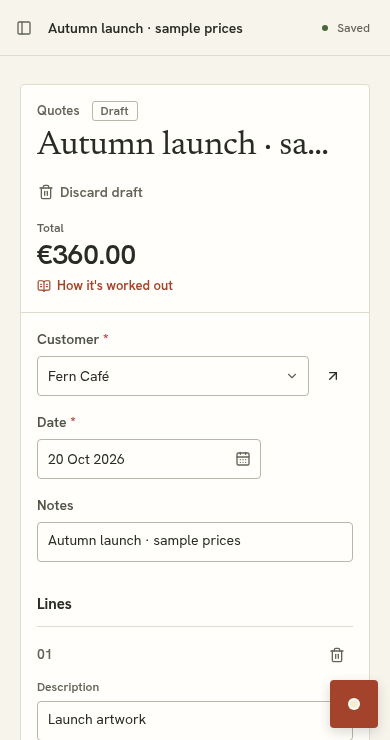
Choose that same customer when preparing the quote.
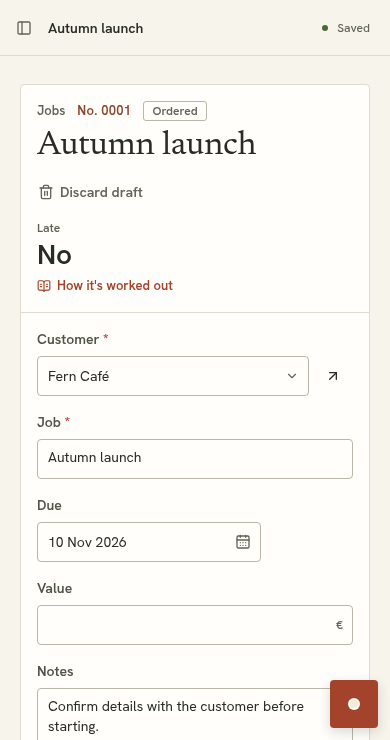
Track the work and date on a customer-linked job.
Quotes and Jobs are configured for this example. Plain signup starts with your business details and customers.
Describe the change, review the proposal, and accept it when it fits.
Then carry on in the same working screen. Try adding Priority to these sample jobs, and edit a record to use it.
See how changes workCustomer-linked work, with due dates and status
| Job / customer | Due / status | Priority |
|---|---|---|
| Autumn launchFern Café | In progress | Normal |
| Reception refreshNorth Studio | To do | Normal |
| Opening weekHarbour Dental | To do | Normal |
The owner asks
“Add priority so I can spot urgent jobs.”
A Priority field on every job. Existing records stay in place.
Review: add Priority to Jobs
Add Normal and Urgent options to each job. Existing jobs start as Normal. Your records and edits stay in place.
Example of a change you can request. Nothing changes until you accept.
Priority added. Open a job above and mark it Urgent.
Examples of tools you can ask to configure, using your records and rules. Start with what matters today; add the next tool when you need it.
Keep contacts together and connect them to the work you do.
Work from your prices and rules, check the draft, then issue the quote.
Turn an enquiry form into a working record.
Work out figures using your business rules and data.
Keep stock items, quantities and the details you need.
Configure supported actions when records change or a schedule runs.
Materials → quotes → documents
Existing quoting starter →Customers → project jobs → due dates
Illustrative configurationCustomers → jobs → visit dates
Illustrative configurationThe same lists and record screens, configured around different work. Studio and service examples are not starter kits.
Useful screens today. The same records tomorrow. Changes you can check before they become part of your work.
Plain signup gives you your business details and customers. Your first additional tool follows a conversation and a proposal you accept.
Start your trial without a card.
Tell Suppled what you keep track of today.
Inspect the proposal, accept it and bring in your data. Confirm example prices before quoting.
Work in normal screens. Ask for a change when you need one.
No. Work in normal lists, record editors and documents. Describe changes in your own words, then review the proposal.
Ask for structured tools using records, relationships, calculations, forms, documents and supported automations. Requests outside current capabilities may not be fulfilled. Suppled explains when it can’t make a change.
You can import spreadsheets into your lists. Review mapped fields and any AI-read prices before using them in calculations.
Invite owners and staff. Owners accept tool changes and manage the team and billing; staff work with records and can ask the agent for changes.
Yes. Accepted tools and saved records stay in your workspace. The editable examples on this website use temporary sample data and reset on reload.
After 14 days, subscribe for $49/month including 3 members. Without a subscription your workspace stays readable, but you can’t make changes. Your data is not deleted when the trial expires.
14 days free. No card needed.
See pricing and trial detailsDemo preview · a storyboard you control. No live AI or automatic playback.

Morgan Studio keeps customer-linked jobs in ordinary working screens. Fern Café’s Autumn launch is due on 10 November. These are fictional records in a configured example, not the tools installed by plain signup.

The example request is: Add a priority field to Jobs, with Normal and Urgent options. This is a prepared demonstration; no live AI runs here.

Review the proposed Priority field. Existing records stay in place. You can discard the proposal or try it before accepting.

The proposal preview shows the changed tool before acceptance. Accepting makes it part of the workspace. The editable example on this site simplifies that sequence.

Priority is now available on the same jobs. Open Autumn launch and change its priority using the record editor. In the product, accepted tools and saved records persist. Changes in the website’s editable example reset on reload.
A working workspace. Morgan Studio keeps customer-linked jobs in ordinary working screens. Fern Café’s Autumn launch is due on 10 November. These are fictional records in a configured example, not the tools installed by plain signup.
Ask for a change. The example request is: Add a priority field to Jobs, with Normal and Urgent options. This is a prepared demonstration; no live AI runs here.
Inspect the proposal. Review the proposed Priority field. Existing records stay in place. You can discard the proposal or try it before accepting.
Try it, then accept. The proposal preview shows the changed tool before acceptance. Accepting makes it part of the workspace. The editable example on this site simplifies that sequence.
Keep working. Priority is now available on the same jobs. Open Autumn launch and change its priority using the record editor. In the product, accepted tools and saved records persist. Changes in the website’s editable example reset on reload.